
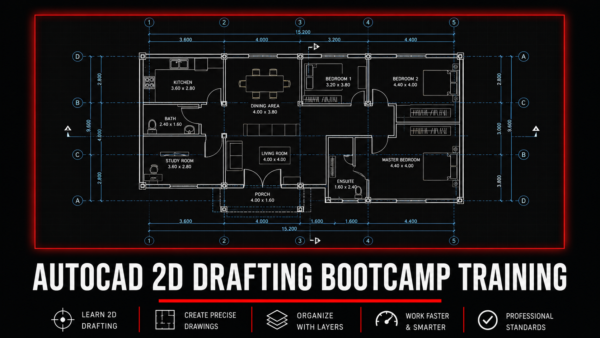
AutoCAD 2D Drafting Bootcamp Training
Master Professional 2D Drafting from Beginner to Practical Level
The AutoCAD 2D Drafting Bootcamp Training is a practical, industry-oriented online training designed to help learners develop strong foundational and professional AutoCAD drafting skills used in engineering, construction, architecture, and technical drawing workflows.
Whether you are a complete beginner who has never opened AutoCAD before or someone who has attempted learning it before but struggled to apply it practically, this course is structured to guide you step by step from the basics to creating complete professional construction drawings.
This is not a theory-heavy course. It is a hands-on practical bootcamp focused on helping you actually use AutoCAD confidently in real drafting situations.
Who This Course Is For
This course is ideal for:
• Civil Engineering Students
• Architecture Students
• Building Technology Students
• Construction Management Students
• Graduate Engineers
• Site Engineers
• Draftsmen and Technicians
• Quantity Surveyors
• Masons and construction professionals looking to understand drawings better
• Anyone interested in learning AutoCAD 2D drafting from scratch
No prior AutoCAD experience is required.
What You Will Learn
By the end of this course, you will be able to:
AutoCAD Fundamentals
• Navigate the AutoCAD interface confidently
• Understand toolbars, command line, ribbons, and workspace setup
• Set drawing units correctly
• Work with precision tools such as Ortho Mode, Polar Tracking, and Dynamic Input
• Master navigation tools such as zoom, pan, and selection methods
Core Drawing Tools
• Draw lines accurately
• Create polylines
• Draw circles, arcs, and rectangles
• Use construction methods for technical drafting
• Create clean, precise technical drawings
Modification Tools
Learn how to professionally edit drawings using:
• Move
• Copy
• Rotate
• Mirror
• Offset
• Trim
• Extend
• Fillet
• Scale
• Stretch
Precision Drafting Techniques
• Object snaps (OSNAP)
• Accurate alignment
• Geometric control
• Coordinate-based drafting
• Construction workflow best practices
Dimensions, Layers & Blocks
Learn how to organize and present professional drawings using:
• Layer management
• Layer properties
• Colors and line weights
• Linetypes
• Dimension styles
• Annotation standards
• Creating reusable AutoCAD blocks
Practical Construction Drawings
Participants will practically draw:
• Complete 2D floor plans
• Architectural layouts
• Room naming and annotations
• Doors, windows, and vents
• Stair placement
• Cross-section indicators
• Roof lines
• Plinth lines
• Elevation drawings
• Section drawings
Practical Workflow Skills
You will also learn:
• Proper drafting workflow from concept to completion
• Drawing organization best practices
• Construction drawing interpretation basics
• Efficient drafting shortcuts and productivity techniques
Course Structure
The training is divided into structured practical modules:
Module 1: AutoCAD Basics
Introduction to the AutoCAD interface, navigation, units, precision settings, and foundational drafting tools.
Module 2: Drawing & Modification Tools
Core drafting commands, shape creation, editing, and practical drawing techniques.
Module 3: Dimensions, Layers & Blocks
Professional drawing organization, annotations, reusable drafting elements, and dimensioning.
Module 4: Drawing a Floor Plan
Practical drafting of a complete floor plan including walls, openings, annotations, and layout planning.
Module 5: Elevation Drawing
Converting floor plans into clean architectural elevation drawings.
Module 6: Section Drawing
Developing complete section drawings from plans using proper construction drawing practices.
Training Format
This course is:
✅ Fully Online
✅ 100% Self-Paced
✅ Practical & Project-Based
✅ Beginner Friendly
✅ Accessible Worldwide
All sessions are pre-recorded, meaning you can:
• Learn at your own pace
• Pause whenever needed
• Rewatch lessons multiple times
• Practice alongside the instructor
• Study according to your schedule
Course Duration
This bootcamp was originally structured as an intensive 3-week guided bootcamp, but because it is now self-paced, participants can complete it according to their own availability.
Recommended completion time: 2–4 weeks depending on your consistency.
What’s Included
Upon enrollment, you receive:
• Full access to all recorded training sessions
• Practical lesson files
• Downloadable reference drawings
• AutoCAD shortcut command guide
• Module quizzes
• Practical assignments
• Guided project drawings
• Access to support and guidance
• Accountability-based learning support
• Lifetime access to course materials
Certification
Upon successful completion of the course and required practical assignments, participants receive a:
Certificate of Completion
This certificate confirms successful completion of the AutoCAD 2D Drafting training and achievement of the required learning outcomes.
Requirements
To take this course, you will need:
• A laptop or desktop computer
• AutoCAD software installed (2018–2024 versions recommended)
• Stable internet connection
• Basic computer skills
• Willingness to practice consistently
Learning Support
Although the course is self-paced, support is still available.
Participants can:
• Ask questions whenever they face challenges
• Receive guidance during learning
• Seek clarification on lessons or assignments
You are not learning alone.
Why Choose This Training?
Because this training focuses on what actually matters:
✔ Practical drafting skills
✔ Real construction drawing workflow
✔ Beginner-friendly teaching
✔ Industry-relevant knowledge
✔ Flexible learning schedule
✔ Lifetime access
✔ Direct support when needed
Enroll Today
Start building your AutoCAD drafting skills today and gain practical knowledge that can support your academic journey, professional growth, or technical career.
Reviews
There are no reviews yet.